01
Open The Application
Open The ACE Application Page.
Go to the official CBP ACE Portal application page. Scroll to Step 3 and choose Importer Application.
Open The CBP Application Page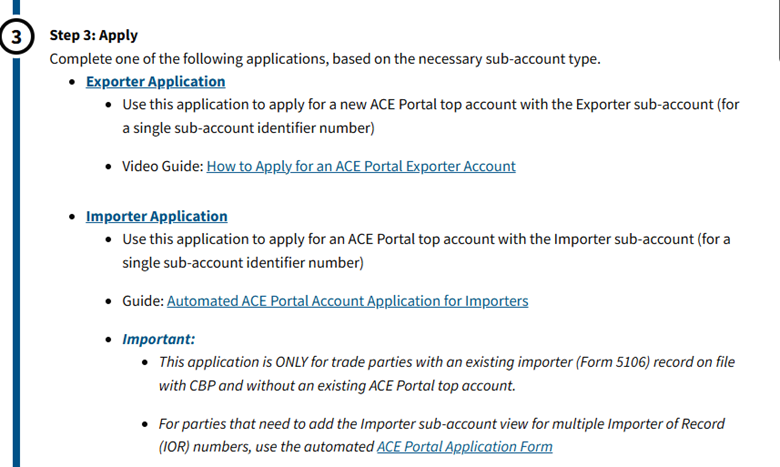
Client Resource · ACE Secure Data Portal
01 / Before You Begin
One Account. Ongoing Visibility.
The ACE Secure Data Portal is CBP’s official system for importers. Your account gives you—and the customs broker working on your behalf—access to your import records. That access is required to process a tariff refund, and you only have to establish it once.
Video Walkthrough
Follow the complete ACE Importer Portal setup in under two minutes, then use the written steps below as a checklist.
The Process
Open The Application
Go to the official CBP ACE Portal application page. Scroll to Step 3 and choose Importer Application.
Open The CBP Application PageMatch CBP Records
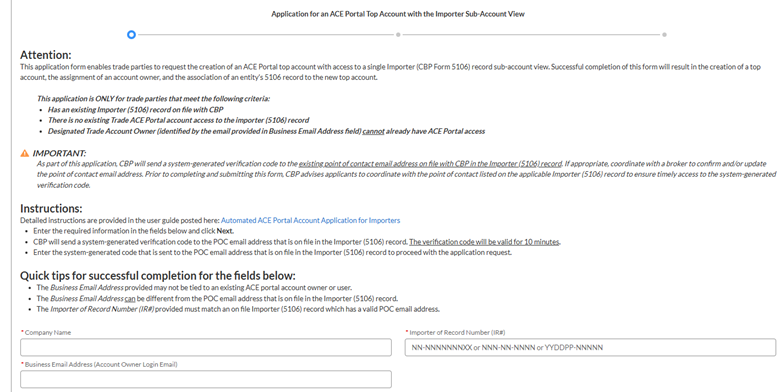
Enter your company name, IR/ID number, and email address exactly as they are listed with CBP. Even a small difference can cause the application to fail.
After submitting, check your email for CBP’s follow-up link. On the next form, complete the required fields marked with a red asterisk.
Create Your Login
When CBP confirms that your account was created, open the ACE Portal login page. Choose Trade/PGA User Login, then create your login using the same email address used in your application.
Open The ACE LoginYour ACE Importer Portal account is now ready for use.
Avoid The Common Delays
Use the same email address for the application, confirmation, and portal login.
Your company name and IR number must match CBP’s records character for character. Copy them from a customs entry document when possible.
Check spam and junk folders if CBP’s confirmation message does not arrive within a few minutes.
If nothing arrives after one business day, contact Lisa Ragan Customs Brokerage and the team will help you identify the next step.
Questions About ACE?
Call or email the Lisa Ragan team if the company information does not match, the confirmation stalls, or you are unsure which ACE option to select.